How to make a Figma design right-to-left (RTL) for Arabic and Hebrew
To make a Figma design RTL, duplicate the frame, reverse the direction of every horizontal auto-layout, swap left and right padding, right-align text, and flip icons that show direction, such as back and forward arrows. Leave logos, media playback controls, clocks and checkmarks unflipped, then switch to fonts that support the script.
Updated · By Mihir Vaghani, founder of The Plugins Company
Mirror a Figma design for Arabic with Lingolense: step by step
- 1
Select the frame
Select the left-to-right frame you want to localize. Lingolense works on a duplicate, so the original stays untouched.
- 2
Choose an RTL language
Pick Arabic, Hebrew, Persian (Farsi) or Urdu as the target language.
- 3
Translate and mirror
Run the translation. Lingolense reverses auto-layouts, swaps padding, flips directional icons and right-aligns text in the same step.
- 4
Check fonts and overflow
Lingolense switches to a font with the right script coverage and flags any layer whose translated text no longer fits.
- 5
Review exceptions
Confirm that logos, media controls and other non-directional elements kept their original orientation.
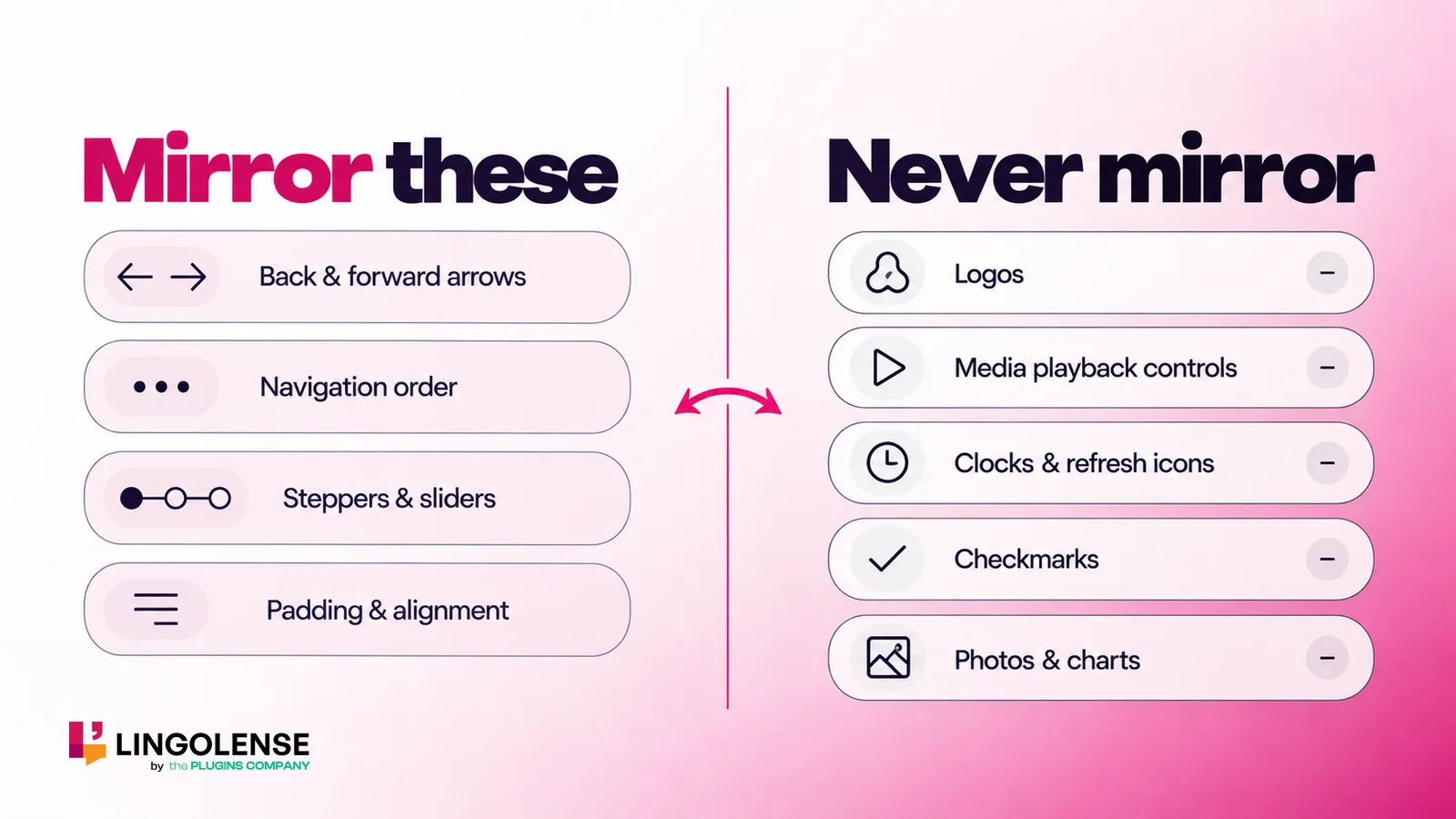
What gets mirrored in an RTL layout
In right-to-left languages people read and scan from the right, so the interface is mirrored around its vertical axis: the start of every row moves to the right edge.
- Horizontal auto-layout order (navigation, toolbars, cards in a row)
- Left and right padding, margins and alignment
- Text alignment: right-aligned by default
- Icons that point somewhere: back and forward arrows, chevrons, “next” buttons
- Progress that runs along a line, such as step indicators and sliders
What should never be mirrored
Google’s Material Design guidance on bidirectionality is the standard reference here. Elements that do not express reading direction keep their orientation:
- Logos and brand marks
- Media playback controls and the media progress bar, which follow the direction of the media
- Clocks and circular refresh or progress icons, which still turn clockwise
- Checkmarks and other symbols that are recognised universally
- Photos, illustrations, charts and phone numbers
Fonts and numbers for Arabic and Hebrew
Latin-only fonts cannot render Arabic or Hebrew letters, so text falls back to a system font or shows empty boxes. Choose a family with the right script coverage at matching weights; Lingolense switches fonts automatically when you translate.
Numbers keep their left-to-right order inside RTL text. Many Arabic-language interfaces use Western digits (0–9), while others use Eastern Arabic numerals, so confirm the convention with the product team.
Doing it by hand vs one click
Mirroring by hand means visiting every auto-layout, padding value, alignment setting and icon in the frame, and doing it again whenever the source design changes. A plugin that mirrors and translates in one pass removes that repetition and leaves you only the exceptions to review.
| Task | By hand | With Lingolense |
|---|---|---|
| Reverse horizontal auto-layouts | Every layout, one by one | Automatic |
| Swap left/right padding | Every frame | Automatic |
| Flip directional icons only | Judge each icon | Automatic; logos left alone |
| Right-align text | Every text layer | Automatic |
| Translate the copy | Copy, translate, paste back | Same step, 45+ languages |
| Catch text that no longer fits | Visual check | Flagged automatically |
Frequently asked questions
Does Figma support right-to-left text?
Figma renders Arabic and Hebrew text, but it does not mirror a layout for you. Auto-layout direction, padding and icons have to be flipped by hand or with a plugin such as Lingolense.
Which languages need an RTL layout?
The most common are Arabic, Hebrew, Persian (Farsi) and Urdu. Lingolense supports RTL mirroring for all four.
Should arrows be flipped in RTL?
Yes, when they show direction, such as back, forward or next. Arrows on media playback controls and clockwise refresh icons are not flipped.
Will mirroring change my original design?
Not with Lingolense. It mirrors a duplicate of the frame, so the original left-to-right design is preserved.
Mirror your first Arabic screen free
True RTL mirroring for Arabic, Hebrew, Persian and Urdu.